

Implementing dynamic pricing is like giving your online store a brain of its own. It senses surges in shopper activity - automatically hikes rates to lock in extra margin. Recognizes rival promotions—swiftly trims prices so you stay irresistible. It ensures you never miss a hot demand window or lose ground in a price war, keeping your competitive edge razor‑sharp. In this guide, we will understand what dynamic pricing in ecommerce is all about, why it is so important today, and how to implement it successfully in your business.
In an industry like ecommerce, where every click matters, dynamic pricing gives you an edge by automatically recalibrating the prices based on real-time signals such as competitor actions, shopper behavior, demand spikes, etc.
Ultimately, your pricing reflects market conditions and customer expectations all year round. Here is a snapshot of an Amazon product whose price has changed constantly throughout the year to reflect market demands:

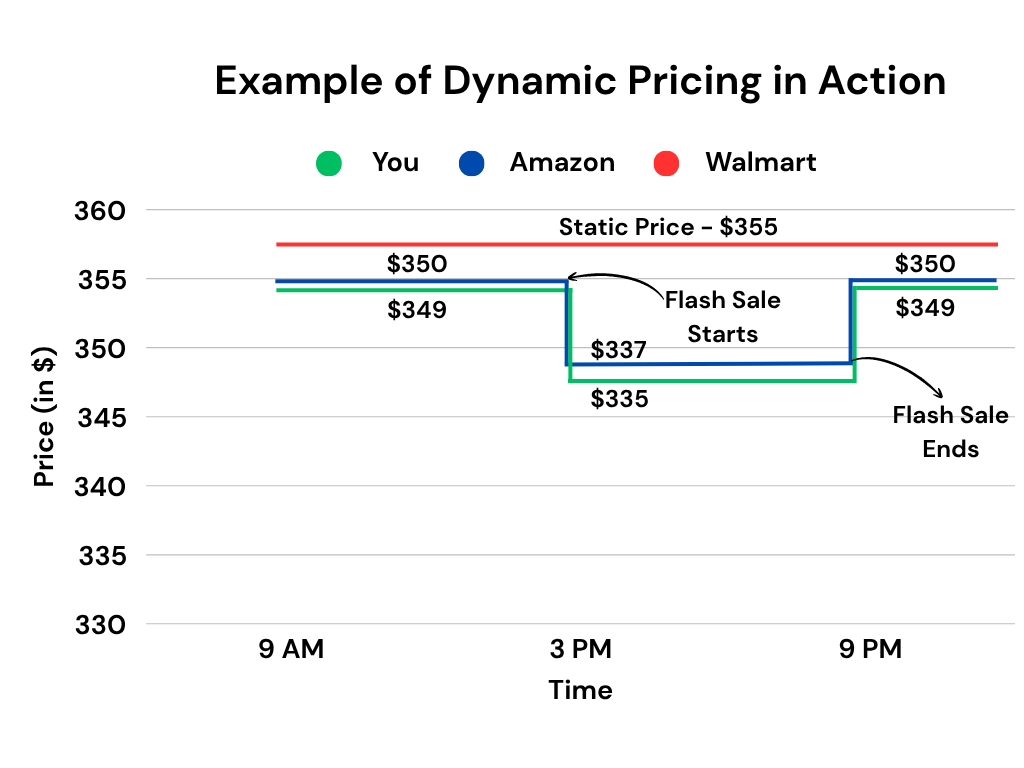
You're an online retailer selling a popular mid-range Android smartphone at $349 on your website. Your dynamic pricing system constantly monitors your competitors:
Using this data, your dynamic pricing engine automatically lowers your price to $335 for the next 6 hours, just undercutting Amazon. Once Amazon's flash sale ends and their price returns to $350, your system readjusts your price back up to $349, keeping your margin healthy while still staying competitive.
There are three main reasons to adopt dynamic pricing in ecommerce today:
By adjusting prices in alignment with the market, dynamic pricing keeps you competitive throughout the year. This is especially helpful in fast-moving ecommerce categories like electronics or fashion. In these industries value of the product can shift quickly due to new trends or technological upgrades.
Dynamic pricing increases your prices automatically when demand is high. This helps optimize margins without sacrificing too many conversions. This is especially helpful in categories that are impacted by the time of the year. Winter wear or festival gifts are the best examples. Since customers are more willing to pay during peak times, you can capture additional margin while still fulfilling demand.
When products aren't selling, dynamic pricing systems can again come to your rescue. It can automatically reduce prices to encourage quicker turnover. This will free up warehouse space. More importantly, it will ensure you are not forced to embrace deep-end-of-season markdowns. Ultimately, you will maintain healthier cash flow all year round.
Implementing a dynamic pricing strategy in your ecommerce business is not a straightforward or overnight task. It requires a strategic approach and a solid understanding of the market. Here are the key steps to follow:

Before applying dynamic pricing, categorize your product catalog. It should ideally be based on these three factors:
Remember - Not every product category benefits from dynamic pricing. Some need stable pricing to preserve brand value, while others can flex to capture sales.
Here is an example of how you can classify your product categories:
Product CategorySales VolumePrice SensitivitySeasonalitySmartphone AccessoriesHighHighLowSmart TVsMediumMediumHighHigh-End HeadphonesLowLowMediumSmart Home DevicesHighMediumLowGaming ConsolesHighVery HighHigh
In the above example, "gaming console" is the best category to implement dynamic pricing as it has a high sales volume, high price sensitivity, and is affected by seasons.
After segmenting your products, the next step is selecting a dynamic pricing model that fits your product category and customer behavior. Each model uses a different logic to adjust pricing dynamically. Here are some of the most commonly used approaches:
Dynamic Pricing StrategyWhat It MeansExampleCompetitor-Based PricingReact to competitor pricing to stay competitiveIf a competitor lists at $389, lower your price to $388 to remain the lowest optionTime-Based PricingVary prices based on time of day, week, or promotional windowOffer the product at $349 instead of $379 during a weekend flash saleInventory-Based PricingModify prices depending on stock availabilityIf stock drops below 10 units, increase the price from $369 to $399Behavior-Based PricingTailor prices based on user behavior and interactionsGive returning users a 10% discount, reducing the price from $399 to $359Demand-Based PricingAdjust prices based on current demand levelsRaise the product price from $399 to $429 during peak holiday demand
Let us go back to our example. For gaming consoles, demand‑based pricing is an ideal option. Why? Because console sales surge around new game releases and major events (e.g., Black Friday). This gives you crystal-clear windows to raise prices and capture extra margin.
Note: Many retailers also adopt a hybrid model that blends two or more of these approaches.
Next, decide on clear rules and guardrails. This helps control how and when prices change. In other words, rules define the conditions under which prices should increase or decrease. It could be based on factors like stock levels, time since last sale, competitor activity, or even demand spikes.
Guardrails, on the other hand, prevent your pricing strategy from going off track. They include setting price floors to avoid selling below cost. They also involve setting price ceilings to protect brand perception.
Let us continue with the same example. Here are the rules you can set based on the pricing model chosen and current observations of sales:
Product CategoryDynamic Pricing Model ChosenCurrent ObservationsRulesGaming ConsoleDemand-BasedSells 30 units/day, but during a new game launch, you see sales jump to 75 units in 24 hours
Next, invest in a dynamic pricing platform. Once subscribed, connect it with your catalog so that it can retrieve real‑time data (like inventory levels and competitor prices). It will also be able to push updated prices back to your catalog automatically.
Map each product SKU from the chosen category to the engine. Ensure that your database fields (like price and stock count) align correctly. Configure the dynamic pricing rules (like price floors and ceilings). Remember - It's important to pick a tool that can handle frequent updates without performance issues.
Before going for a full-scale rollout, start with a pilot launch. Use one or two SKUs from the selected category and deploy the strategy. Once deployed, closely monitor key metrics such as:
This will help you gauge the impact of your price adjustments. Look for any unintended consequences (e.g., sudden drops in sales volume or customer complaints). More importantly, be prepared to refine your rule thresholds based on early feedback.
If all is well and your pilot demonstrates positive results and stability, expand the coverage gradually. Include products from the entire category or more categories. Establish ongoing performance monitoring through dashboards or scheduled reports. Finally, set clear alert thresholds for anomalies, such as rapid margin erosion or inventory shortages.
As technologies get better and better, the ability to personalize pricing dynamically will only get sharper in the coming days. Businesses that adopt this agile approach today will set themselves up to lead tomorrow.
That's where Anakin can help. It is a pricing intelligence platform carefully designed for ecommerce businesses of the future - the ones that need agility and flexibility in pricing decisions from day one. The platform's flexible architecture means you can experiment and execute any type of dynamic pricing strategy across categories or SKUs. So, ready to explore Anakin's dynamic pricing capabilities? Book a free demo now.
Written by Anakin Team